
I haven't confirmed it yet (and you'll understand why after I explain it) but I was told that the Dell Client Manager agent that comes with the Dell Management Console was causing issues on some D620 units that had the Nvidia chipset. On those units the entire LCD stopped working and require Dell to replace the motherboard and LCD. While this series of laptop has been plagued by Nvidia related issues, I was assured that these units had been running fine for a few years already and the sheer quantity of them failing at the same time was unlikely. The current suspect is the SoftOSD component which gets installed as part of the Dell Client Manager Agent. I looked up this component and it appears to be directly related to video card/output manipulation which only adds to our suspicions.
Also, these units seemed to all have been docked for at least some of the time prior to their failure and caused odd resets on the external monitor.
While this hasn't been verified yet, I would recommend that you uninstall the SoftOSD component off any D620 with the Nvidia chipset until we know one way or another. I'm not exactly willing to offer up any of my D620's for testing sacrifice. :)
Wednesday, May 13, 2009

Wednesday, April 22, 2009
KB 968078 (MS09-016) broke RDP on my ISA 2006 server
I really shouldn't be surprised since the last time I installed a hotfix for my ISA 2006 SP1 (win2k3 sp2 with all offloading, etc turned off) it broke RDP as well. I've already seen other forum hits on this now as well. I uninstalled it for now as being without RDP access to that server is not an option right now. Others have reported VPN problems and problems starting up standard edition with 4+ cpu cores. I'm not going to fool with it until I see a new patch come out or a resolution for this problem.
some other references to this issue:
http://forums.isaserver.org/m_2002085188/mpage_1/key_968078/tm.htm#2002085188
http://blogs.technet.com/isablog/archive/2009/04/18/ms09-012-and-isa-server-standard-edition-14109-failures.aspx
some other references to this issue:
http://forums.isaserver.org/m_2002085188/mpage_1/key_968078/tm.htm#2002085188
http://blogs.technet.com/isablog/archive/2009/04/18/ms09-012-and-isa-server-standard-edition-14109-failures.aspx
Wednesday, April 15, 2009
Symantec Mail Security for Exchange Named Piped Error updating license
Yes, you read that right, "The Named Piped could not be found" and because of that misspelling, you won't find the answer on their knowledge base.
I was trying to Add my new updated license files through the management console for Symantec Mail Security for Exchange and I got that error. The real error should read named pipe instead of piped and that's how you'll find it in their KB. When you get this cool error, you'll also notice the checkbox for "Enable Premium Antispam" gets whacked and your users start complaining about spam.
http://service1.symantec.com/support/ent-gate.nsf/docid/2007072606354254
Basically they'll have you stop both the services and manually wipe out the existing license files that are there. Then restart the services and try to add them again. Fortunately, this actually worked for me. Make sure to re-enable the premium antispam checkbox if you have that service.
I was trying to Add my new updated license files through the management console for Symantec Mail Security for Exchange and I got that error. The real error should read named pipe instead of piped and that's how you'll find it in their KB. When you get this cool error, you'll also notice the checkbox for "Enable Premium Antispam" gets whacked and your users start complaining about spam.
http://service1.symantec.com/support/ent-gate.nsf/docid/2007072606354254
Basically they'll have you stop both the services and manually wipe out the existing license files that are there. Then restart the services and try to add them again. Fortunately, this actually worked for me. Make sure to re-enable the premium antispam checkbox if you have that service.
Wednesday, April 8, 2009
Dell Management Console - free as in beer
So if you're like me and your budget this year doesn't seem to cover anything more than replacing machines that are on fire and burning to ashes and you happen to have a mostly or all Dell infrastructure, then the new DMC (Dell Management Console) may be for you. It's based on the Altiris Server platform and can help you with everything from hardware inventories to pushing bios updates and even individual bios settings such as enabling bitlocker support. It slices, it dices, and can even manage your dell kvms, network switches, etc. If you want to find out more, click the link below.
DMC:
http://www.dell.com/content/topics/global.aspx/sitelets/solutions/management/openmanage_console?c=us&cs=555&l=en&s=biz
Dell DMC FAQ:
http://en.community.dell.com/groups/dell_management_console/wiki/dmc-faq.aspx
When you're ready, just fill out the short registration on their website and get your two sets of license keys that you'll need for the install to activate the Dell Client Manager and the Dell Management Console. You'll also be provided with a link to download the ISO to install it.
http://www.dell.com/openmanage/register
First off you'll need a halfway decent box. Symantec/Altiris/Dell recommends a dual processor box with 4GB of RAM in it. It also has to be running some variant of Windows 2003 Server and it has to be a 32 bit version. To top it off, they also only current support IE7. A copy of SQL 2005 Express edition is included in the installer but the docs and the installer deem it necessary to remind you at every corner that the performance will be much better with a real copy of SQL server. You'll also need to have .net framework 3.5 installed. (I've currently got it running on a Octiplex 755 until I'm done testing.)
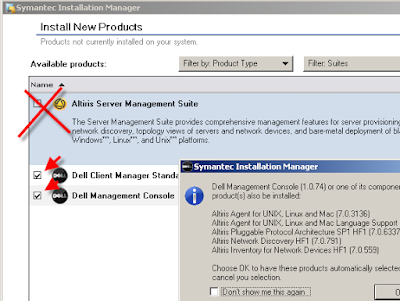
So next we're off to the install portion and the first opportunity to trip you up. One of the first things you'll notice in the screenshot below is that the Altiris Server product is listed in addition to the Dell components. If you check that it'll install an eval license and a bunch more junk that you don't really need.
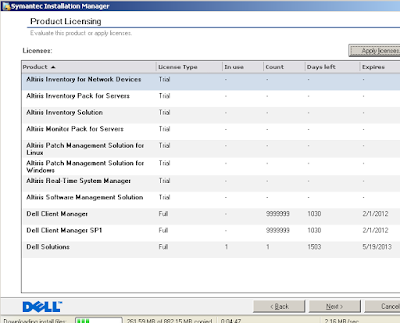
Here's a screenshot if you had gone that route. You'll notice the boatload of Trial licenses. If you didn't choose that Altiris checkbox you should only seen 1 Trial one. (yeah, I don't know why either)
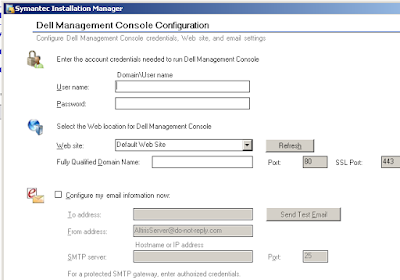
Prior to the screen above, you'll have been prompted for the license text files that you received earlier. It's pretty straightforward for the rest of the install; stuff like smtp server, user account to use, etc. As with all Symantec installers the pre-install checks will have some yellow warning triangles left. Since they're only warnings and not Errors you can proceed. (Don't get me wrong, their installer is nice but I just can't ever seem to get all the warnings to go away.)
So it's installed, what now? Well, if it didn't do it for you, you'll need to open an IE7 window to https://yourservername.withfullfqdn.domain/ (provided you set up SSL ahead of time. (see README on the CD). Depending on whether or not you've ever used Altiris you may find the number of options and menus Daunting. Let's cut to the chase and click on the Home icon, then Dell Client Manager.
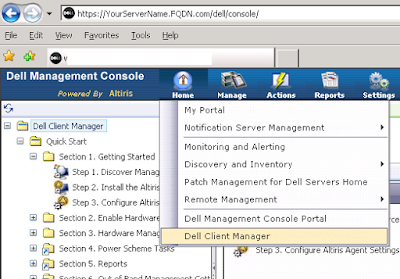
On the left you'll see a Quick Start tree which will walk you through network discovery, pushing the Altiris Agent, Agent settings, and quite importantly the Dell hardware client which will run on the Agents and collect hardware data for you. There's also some tutorial videos buried inside somewhere but I figured out more stuff just by clicking around and using the online help. You also have to keep in mind that the DMC only uses a fraction of the Altiris Server's abilities so you may see references to functions that you don't have.
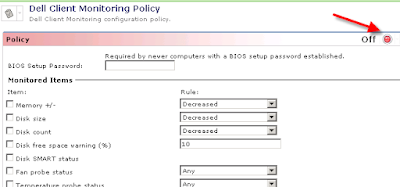
You'll also notice that most things are turned off by default which is good. The idea is that you configure and enable them as you need them. To turn them on, just click on the red button and change it to On and then the Save button at the bottom.
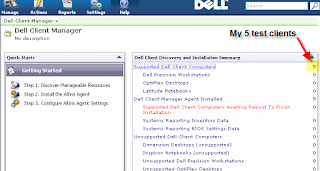
Provided you've made it past the agent installs, you'll soon see them show up in the dashboard. Below you'll see the 5 test machines in my environment listed.
Click on it and it'll open up a series of Reports that allow you to drill down into each machine. (double-click in some places)
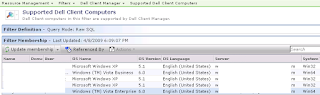
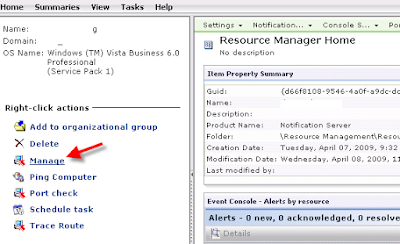
And yes, I too suffer from a 2 to 4 second delay on each page load.
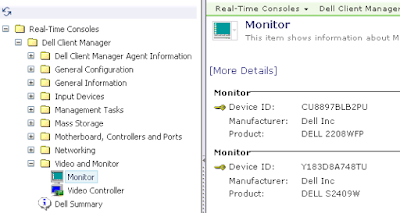
And as you can see it gives you quite a bit of information about the client machine. Sometimes it's useful to know things like video card models, bios version, etc prior to working on a desktop call.
I was also impressed with the granular control it provides over bios settings:

*note - while it does support bios passwords, it doesn't like passwords with special characters or spaces.
Well, that's all for today. I still have to play around with it a bit more to see what else it can do.
Notes:
1. The free DMC edition is what they call Standard edition. Which I'm under the impression means that there's a Pro version that has more bells and whistles for the right price.
2. I haven't played with any of their other recent IT openmanage products so I can't tell you how many of these features are new in comparison.
DMC:
http://www.dell.com/content/topics/global.aspx/sitelets/solutions/management/openmanage_console?c=us&cs=555&l=en&s=biz
Dell DMC FAQ:
http://en.community.dell.com/groups/dell_management_console/wiki/dmc-faq.aspx
When you're ready, just fill out the short registration on their website and get your two sets of license keys that you'll need for the install to activate the Dell Client Manager and the Dell Management Console. You'll also be provided with a link to download the ISO to install it.
http://www.dell.com/openmanage/register
First off you'll need a halfway decent box. Symantec/Altiris/Dell recommends a dual processor box with 4GB of RAM in it. It also has to be running some variant of Windows 2003 Server and it has to be a 32 bit version. To top it off, they also only current support IE7. A copy of SQL 2005 Express edition is included in the installer but the docs and the installer deem it necessary to remind you at every corner that the performance will be much better with a real copy of SQL server. You'll also need to have .net framework 3.5 installed. (I've currently got it running on a Octiplex 755 until I'm done testing.)
So next we're off to the install portion and the first opportunity to trip you up. One of the first things you'll notice in the screenshot below is that the Altiris Server product is listed in addition to the Dell components. If you check that it'll install an eval license and a bunch more junk that you don't really need.

Here's a screenshot if you had gone that route. You'll notice the boatload of Trial licenses. If you didn't choose that Altiris checkbox you should only seen 1 Trial one. (yeah, I don't know why either)

Prior to the screen above, you'll have been prompted for the license text files that you received earlier. It's pretty straightforward for the rest of the install; stuff like smtp server, user account to use, etc. As with all Symantec installers the pre-install checks will have some yellow warning triangles left. Since they're only warnings and not Errors you can proceed. (Don't get me wrong, their installer is nice but I just can't ever seem to get all the warnings to go away.)

So it's installed, what now? Well, if it didn't do it for you, you'll need to open an IE7 window to https://yourservername.withfullfqdn.domain/ (provided you set up SSL ahead of time. (see README on the CD). Depending on whether or not you've ever used Altiris you may find the number of options and menus Daunting. Let's cut to the chase and click on the Home icon, then Dell Client Manager.

On the left you'll see a Quick Start tree which will walk you through network discovery, pushing the Altiris Agent, Agent settings, and quite importantly the Dell hardware client which will run on the Agents and collect hardware data for you. There's also some tutorial videos buried inside somewhere but I figured out more stuff just by clicking around and using the online help. You also have to keep in mind that the DMC only uses a fraction of the Altiris Server's abilities so you may see references to functions that you don't have.
You'll also notice that most things are turned off by default which is good. The idea is that you configure and enable them as you need them. To turn them on, just click on the red button and change it to On and then the Save button at the bottom.

Provided you've made it past the agent installs, you'll soon see them show up in the dashboard. Below you'll see the 5 test machines in my environment listed.

Click on it and it'll open up a series of Reports that allow you to drill down into each machine. (double-click in some places)


And yes, I too suffer from a 2 to 4 second delay on each page load.

And as you can see it gives you quite a bit of information about the client machine. Sometimes it's useful to know things like video card models, bios version, etc prior to working on a desktop call.
I was also impressed with the granular control it provides over bios settings:

*note - while it does support bios passwords, it doesn't like passwords with special characters or spaces.
Well, that's all for today. I still have to play around with it a bit more to see what else it can do.
Notes:
1. The free DMC edition is what they call Standard edition. Which I'm under the impression means that there's a Pro version that has more bells and whistles for the right price.
2. I haven't played with any of their other recent IT openmanage products so I can't tell you how many of these features are new in comparison.
Wednesday, March 11, 2009
Word 2007 (winword.exe) won't open, no gui, process dies quickly
So I had a user report that they were having problems opening any office programs. They weren't being shown a GUI and when I checked the Task Manager I could see the process flash up for a few seconds then die. Running winword /a manually had the same effect. So I started troubleshooting:
1. Logged on as a different user - worked fine
2. Rebuilt the user's profile - still not working
3. Tried removing various Office registry keys as suggested on some web sites. - no change
4. Reinstalled office 2007 completely - no change.
5. Started using brain, downloaded Process Monitor from the old sysinternals site.
http://technet.microsoft.com/en-us/sysinternals/bb896653.aspx
I started the capture, tried to open word, then stopped the capture. I then set the Filter to show Process Name - winword.exe and then went down the list. And then noticed about a hundred errors related to opening this one registry key.
HKEY_LOCAL_MACHINE\SOFTWARE\Microsoft\Windows\CurrentVersion\Installer\UserData\S-1-5-21-632034446-1996701954-922709458-10172\Components
(Note: On your computer, the SID will be different). It had some weird file in it with rgb in the name so I backed up the key and then ripped out the SID entry completely. And then Voila, I was once again able to open office applications as that user.
1. Logged on as a different user - worked fine
2. Rebuilt the user's profile - still not working
3. Tried removing various Office registry keys as suggested on some web sites. - no change
4. Reinstalled office 2007 completely - no change.
5. Started using brain, downloaded Process Monitor from the old sysinternals site.
http://technet.microsoft.com/en-us/sysinternals/bb896653.aspx
I started the capture, tried to open word, then stopped the capture. I then set the Filter to show Process Name - winword.exe and then went down the list. And then noticed about a hundred errors related to opening this one registry key.
HKEY_LOCAL_MACHINE\SOFTWARE\Microsoft\Windows\CurrentVersion\Installer\UserData\S-1-5-21-632034446-1996701954-922709458-10172\Components
(Note: On your computer, the SID will be different). It had some weird file in it with rgb in the name so I backed up the key and then ripped out the SID entry completely. And then Voila, I was once again able to open office applications as that user.
Thursday, February 19, 2009
Solved: ISA 2006 WSS 3.0 extranet password prompt for office docs
So I finally got around to publishing our Windows Sharepoint Services 3.0 server through the ISA box. I set it up with Kerberos Delegation as to avoid any authentication issues and of course Forms Based Authentication. First thing I found out was that you do not want anything on the initial landing page that takes time to load such as a world clock/weather web part that has 4 countries in it. Let's just say ISA tacked on an extra 30 seconds to the load time of the page. Anyway, the next thing was getting All the Link translation mappings right like redirecting http to https for internally hardcoded links, netbios to dns, etc. (And all this on top of setting up Alternate Access Mappings (AAM) on the sharepoint server.
Then I noticed that Extranet users were getting prompted for authentication when they tried to open Office docs (.doc/.xls/.ppt). After much digging, I found the resolution on a message board.
http://www.tech-archive.net/Archive/ISA/microsoft.public.isa.publishing/2007-11/msg00005.html
"turn on persistent cookies (Web Listener | Forms | Advanced Form
Options)"
Entertainingly enough, when I went into the help for that setting it specifically lists that this setting is exactly for this Sharepoint problem! ARGH.
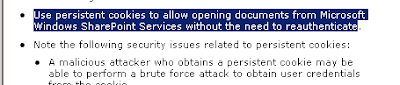
So I enabled mine for the 'only on private computers' and voila, the darn things works fine now.
*Caveat: They do warn you when you turn this on that it does create a cookie on the client machine that may contain sensitive data. Personally, if you fall into the following two scenarios I don't think that's a problem.
1.) You encrypt your laptop users' machines.
2.) You can't stand users whining about extra prompts.
Make sure that you pay attention to how long the Private and Public session timeouts since you're now using a persistent cookie.
Note: Some vista boxes may need a patch:
http://support.microsoft.com/kb/943280
Then I noticed that Extranet users were getting prompted for authentication when they tried to open Office docs (.doc/.xls/.ppt). After much digging, I found the resolution on a message board.
http://www.tech-archive.net/Archive/ISA/microsoft.public.isa.publishing/2007-11/msg00005.html
"turn on persistent cookies (Web Listener | Forms | Advanced Form
Options)"
Entertainingly enough, when I went into the help for that setting it specifically lists that this setting is exactly for this Sharepoint problem! ARGH.

So I enabled mine for the 'only on private computers' and voila, the darn things works fine now.
*Caveat: They do warn you when you turn this on that it does create a cookie on the client machine that may contain sensitive data. Personally, if you fall into the following two scenarios I don't think that's a problem.
1.) You encrypt your laptop users' machines.
2.) You can't stand users whining about extra prompts.
Make sure that you pay attention to how long the Private and Public session timeouts since you're now using a persistent cookie.
Note: Some vista boxes may need a patch:
http://support.microsoft.com/kb/943280
Thursday, January 22, 2009
The Syntax for set-outlookanywhere decrypted
Exchange 2007, SP1 (not rtm)
Okay, I know I can be a bit slow on the uptake for some of these powershell commands but this one took way too long to get right. All the nice friendly examples from msdn leave out the Identity parameter. Powershell will be more than happy to barf an error back to you if you leave it out.
http://technet.microsoft.com/en-us/library/bb124149.aspx
Just what is this identity thing anyway? It's pretty much your CAS_Servername\rpc (Default Web Site)

So next you're asking why am I bothering since we've got a nice GUI, etc for setting up outlook anywhere and the permissions on the IIS folder /rpc. Well, through the careful string of failures at getting NTLM to work transparently through my ISA server (whilst still requiring rpc validation at the isa server itself), I determined that Basic authentication was good enough for me. But I still use NTLM for the web publishing rule from the ISA server to the exchange CAS server. With the advent of SP1 for exchange 2007, you can easily setup your server to use different combinations of Basic and NTLM for the Outlook Anywhere and RPC folders respectively. When your server generates AutoDiscover.xml it provides the client with the authentication level that is specified in the -ClientAuthentication Method. But if you want your ISA server to communicate with the exchange CAS with NTLM, then you have to set the -IISAuthentication parameter. (yeah, headaches abound). To see what your CAS server is using, run Get-OutlookAnywhere from powershell
ClientAuthenticationMethod : Basic
IISAuthenticationMethods : {Ntlm}
In summary:
1. My remote users have outlook 2007 sp1 and get autoconfigured to use Basic Auth.
2. My ISA server publishing rule uses NTLM for Authentication Delegation.
3. My rpc folder in IIS just has Integrated Auth checked.
For more information including how to setup an Exch 2007/ISA 2007/Outlook Anywhere/etc check out the following links:
Great tutorial by Thomas Shinder - covers everything from the setup of the exchange server, through the publishing in ISA all the way to the outlook client config:
http://www.isaserver.org/tutorials/Publishing-Exchange-2007-OWA-Exchange-ActiveSync-RPCHTTP-using-2006-ISA-Firewall-Part1.html
The ever reliable petri database:
http://www.petri.co.il/outlook_anywhere_2007_w_isa_server.htm
More info on the set-outlookanywhere syntax:
http://www.exchange-genie.com/2008/02/configuring-outlook-anywhere-for-exchange-2007-sp1/
Paper on setting up transparent authentication/NTLM with isa 2006 and exchange 2007. I did eventually get it to work in a test environment.
http://blog.msfirewall.org.uk/2008/07/publishing-exchange-2007-services-with.html
Okay, I know I can be a bit slow on the uptake for some of these powershell commands but this one took way too long to get right. All the nice friendly examples from msdn leave out the Identity parameter. Powershell will be more than happy to barf an error back to you if you leave it out.
http://technet.microsoft.com/en-us/library/bb124149.aspx
Just what is this identity thing anyway? It's pretty much your CAS_Servername\rpc (Default Web Site)

So next you're asking why am I bothering since we've got a nice GUI, etc for setting up outlook anywhere and the permissions on the IIS folder /rpc. Well, through the careful string of failures at getting NTLM to work transparently through my ISA server (whilst still requiring rpc validation at the isa server itself), I determined that Basic authentication was good enough for me. But I still use NTLM for the web publishing rule from the ISA server to the exchange CAS server. With the advent of SP1 for exchange 2007, you can easily setup your server to use different combinations of Basic and NTLM for the Outlook Anywhere and RPC folders respectively. When your server generates AutoDiscover.xml it provides the client with the authentication level that is specified in the -ClientAuthentication Method. But if you want your ISA server to communicate with the exchange CAS with NTLM, then you have to set the -IISAuthentication parameter. (yeah, headaches abound). To see what your CAS server is using, run Get-OutlookAnywhere from powershell
ClientAuthenticationMethod : Basic
IISAuthenticationMethods : {Ntlm}
In summary:
1. My remote users have outlook 2007 sp1 and get autoconfigured to use Basic Auth.
2. My ISA server publishing rule uses NTLM for Authentication Delegation.
3. My rpc folder in IIS just has Integrated Auth checked.
For more information including how to setup an Exch 2007/ISA 2007/Outlook Anywhere/etc check out the following links:
Great tutorial by Thomas Shinder - covers everything from the setup of the exchange server, through the publishing in ISA all the way to the outlook client config:
http://www.isaserver.org/tutorials/Publishing-Exchange-2007-OWA-Exchange-ActiveSync-RPCHTTP-using-2006-ISA-Firewall-Part1.html
The ever reliable petri database:
http://www.petri.co.il/outlook_anywhere_2007_w_isa_server.htm
More info on the set-outlookanywhere syntax:
http://www.exchange-genie.com/2008/02/configuring-outlook-anywhere-for-exchange-2007-sp1/
Paper on setting up transparent authentication/NTLM with isa 2006 and exchange 2007. I did eventually get it to work in a test environment.
http://blog.msfirewall.org.uk/2008/07/publishing-exchange-2007-services-with.html
Tuesday, January 20, 2009
ISA 2006 Remote Desktop problem
So up until recently I was able to remote desktop into my ISA 2006 server from my management desktop. I verified that my management computers were still defined properly and I confirmed that the packets were being received on port 3389 at the firewall side. I decided to remove the recently applied KB956570 (08-037) and voila my remote desktop started working again! The patch was supposed to randomize NAT connections, etc but apparently it likes to kill RDP. Upon further research, I've also seen reference to it causing havoc for PPTP/VPN setups as well. As I have not found a real fix for it, I'd recommend you just uninstall it from Add/Remove programs (make sure the checkbox is marked for Show Updates).
Subscribe to:
Posts (Atom)

 Posts
Posts


